6 situation-specific Lightroom presets for travel photography in natural light, family moments, and every kind of trip
Why I Built These Travel Photography Lightroom Presets
I’ve tried a lot of Lightroom presets for travel photography. Most of them looked great in the preview and strange on my actual photos. Too moody. Too saturated. Too much time spent fixing what the preset broke instead of just moving on.
We travel as a family. We’re hiking with kids, chasing golden hour at national park overlooks, eating camp food at picnic tables, and finding ourselves in every kind of light imaginable. I needed presets that could keep up — not a one-size-fits-all filter that I had to fight for every shot.
So I built my own.
Six presets, each one designed for a specific lighting condition. Direct sun. Open shade. Golden hour. Overcast mornings. Indoor and flat lay. Beach and tropical. Apply it, bump exposure if needed, done. That’s the whole workflow.
If you’ve ever felt guilty for spending more time editing than actually being on the trip or you just want to enjoy being with your family, these are for you.
What’s Included
WMT Wild & Warm is a complete pack of 6 natural Lightroom presets for travel and family photography, plus everything you need to get them installed and using them the same day.
6 .xmp preset files — work in Lightroom Classic (desktop) and Lightroom Mobile (iOS and Android)
Step-by-step installation guide — covers both Lightroom Classic and Lightroom Mobile, with troubleshooting for common issues
Preset guide — tells you exactly when to reach for each preset, what lighting it works best in, and how to tweak it if needed
The 6 Lightroom Presets
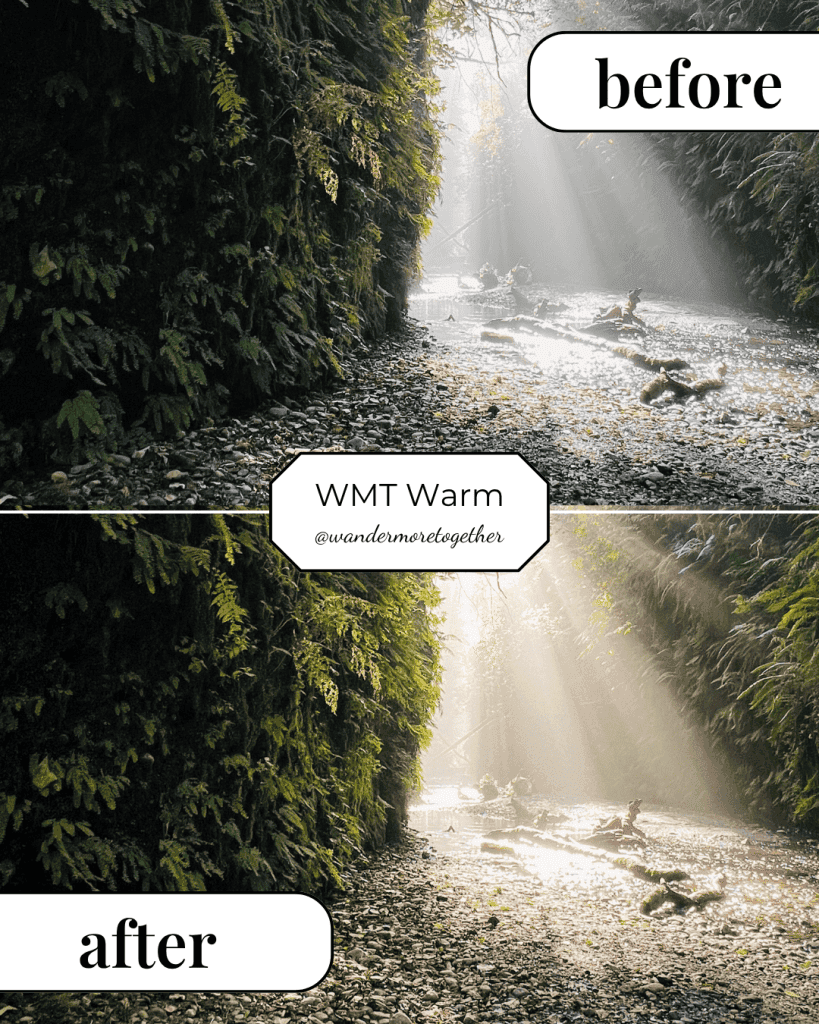
WMT Warm
For sunny outdoor shots in direct natural light. Brings out warmth in greenery, trail textures, and earthy tones without washing out the sky. Best for meadows, forest trails, canyon walls, and any shot where the earth is the star.
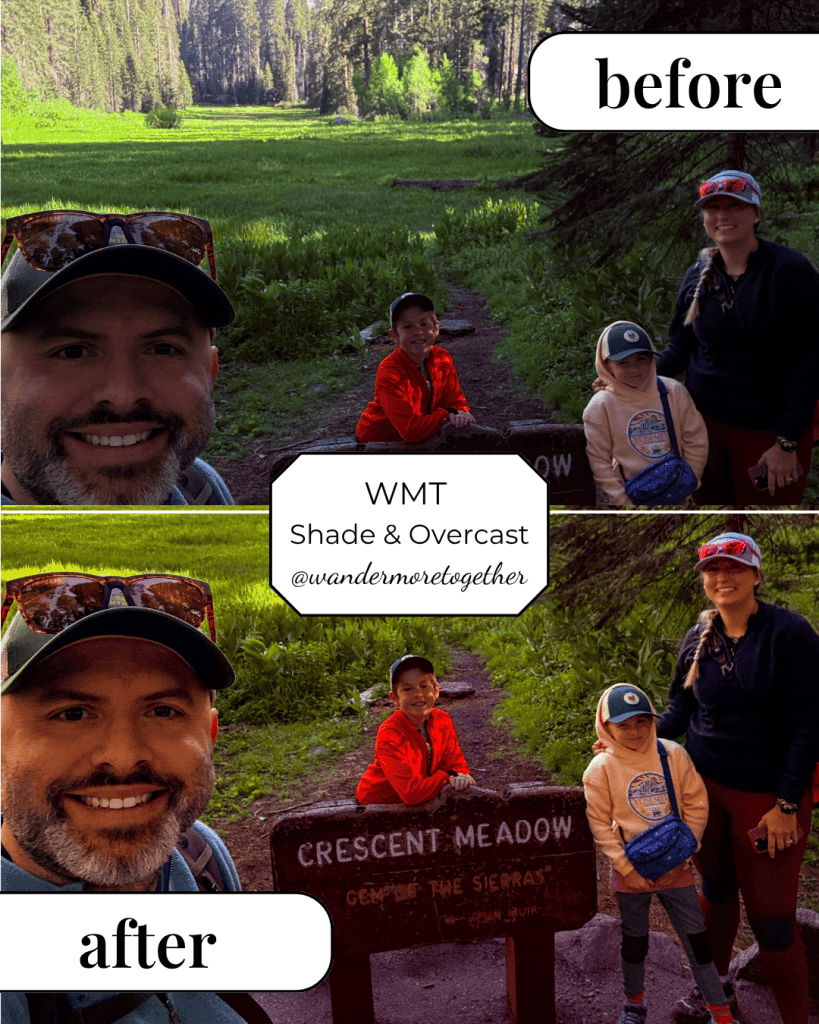
WMT Shade & Overcast
For shaded or cloudy conditions where the light is flat and cool. Adds warmth and balance so photos taken under tree canopy, on overcast mornings, or in open shade don’t look grey and lifeless. Great for portraits — diffused light is flattering and this preset makes it feel intentional.
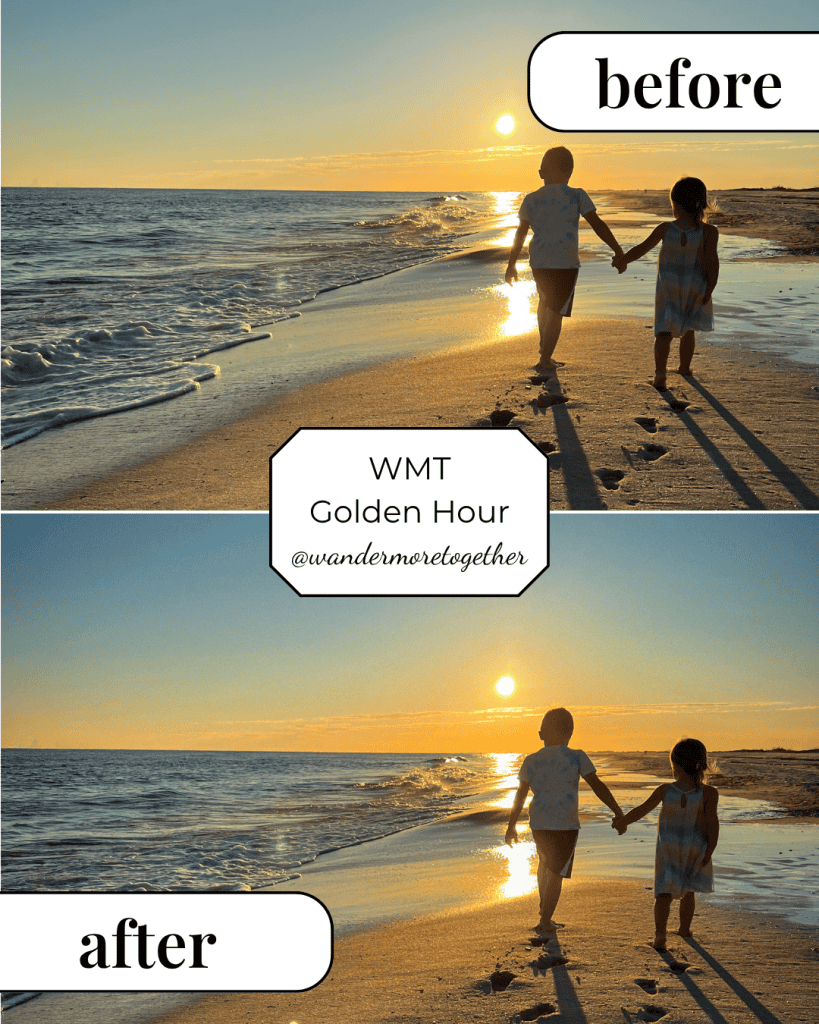
WMT Golden Hour
For the first and last hour of daylight. Amplifies the warm, low light of sunrise and sunset without pushing into unnatural orange. If you’re at a national park overlook at dusk, this is the preset you want to use.
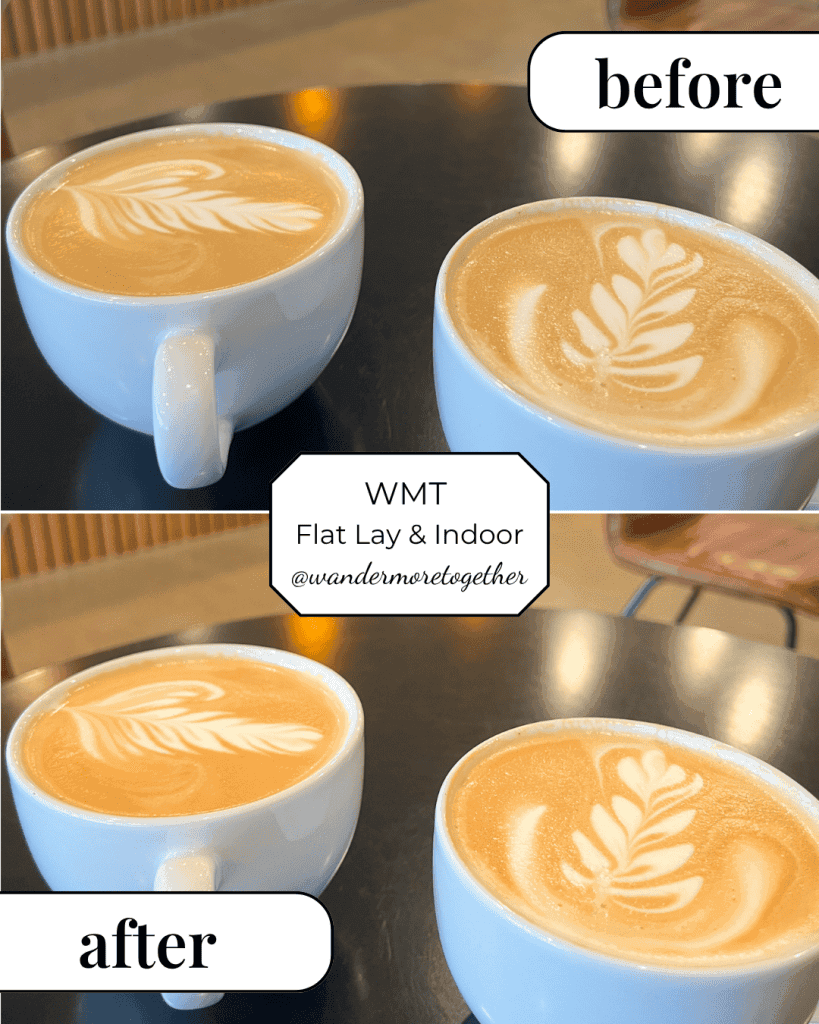
WMT Flat Lay & Indoor
For styled shots and indoor photography. Cleans up color casts from artificial and window light so the result looks neutral, clean, and true to life. Works on café shots, gear flat lays, hotel rooms, and anything styled on a surface.
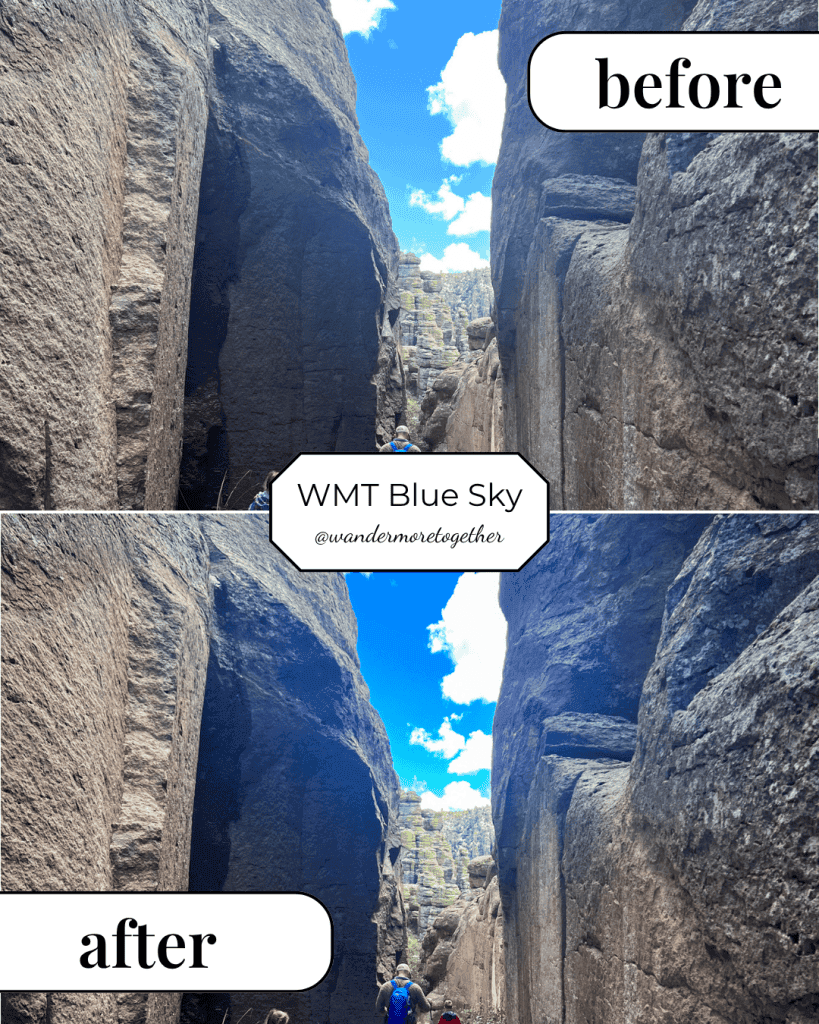
WMT Blue Sky
For wide landscape shots with open sky. Deepens blue tones and adds crispness to clear-day shots without over-saturating. Best used when the sky is a significant part of the frame — mountain summits, open plains, desert landscapes.
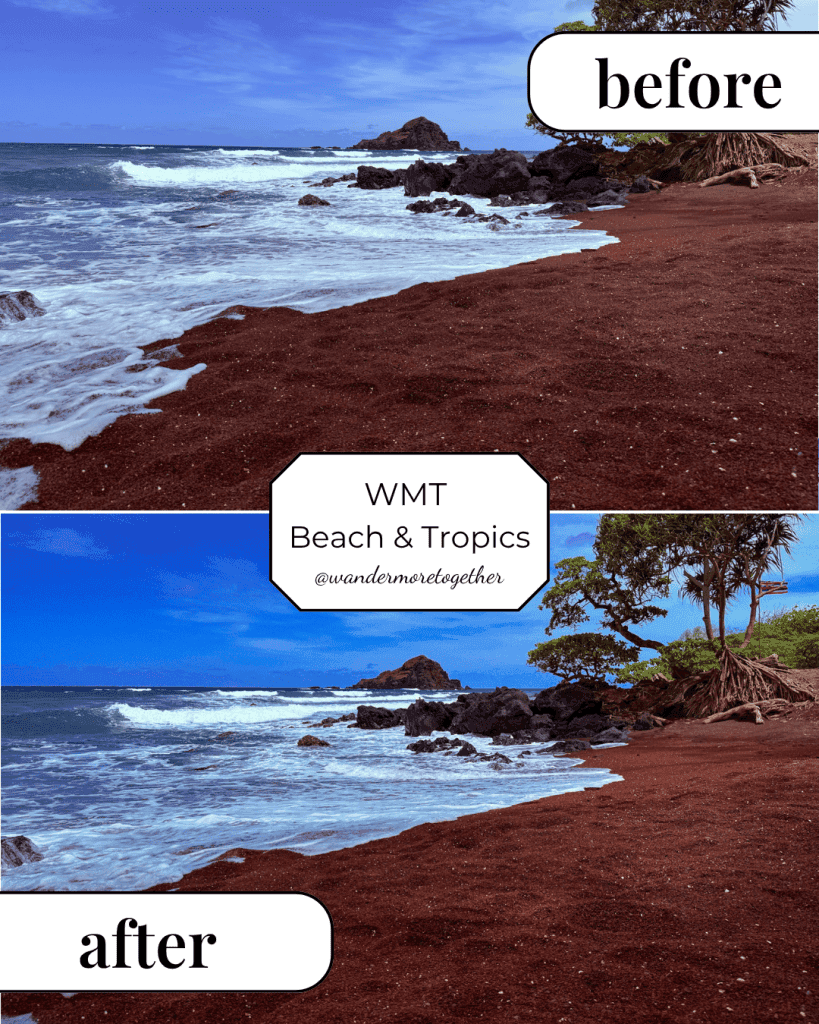
WMT Beach & Tropics
For ocean, beach, and tropical destinations. Brings out teal water, rich greens, and the bright, warm light of coastal photography. Built specifically for Hawaii trips, Pacific coast drives, and anywhere lush and tropical.
Who These Presets Are For
These natural Lightroom presets for travel photography were built for people who:
- Shoot in natural light and want edits that look real, not filtered
- Travel with family and need a fast workflow that doesn’t eat into trip time
- Want situation-specific presets instead of one generic look applied to everything
- Use Lightroom Classic, Lightroom Mobile, or both
- Shoot RAW (though they work on JPEGs too)
They are not for photographers chasing the dark, moody, desaturated look. These presets are warm, clean, and true to life.
How They Work
Download the ZIP file, unzip it, and import the .xmp files into Lightroom using the included installation guide. Most people are set up in under five minutes.
Apply the preset that matches your lighting situation. Make a small exposure adjustment if needed. In most cases, that’s it.
The preset guide in your download explains exactly when to use each one, what to watch for, and how to make quick adjustments for edge cases. It takes the guesswork out of the choosing.
Frequently Asked Questions
Do these work in Lightroom Mobile? Yes. The .xmp files work in Lightroom Classic and can be imported directly into Lightroom Mobile. If you use Adobe Creative Cloud to sync your presets, they’ll appear in both automatically.
Do I need to shoot in RAW? RAW files will give you the best results, but these presets work on JPEGs too. You may need a slightly larger exposure adjustment on JPEG files. But to save space on my phone, I generally just do JPEGs and it works great too!
I’ve never installed a preset before. Is it complicated? Not at all. Every download includes a step-by-step installation guide with screenshots for both Lightroom Classic and Lightroom Mobile. Most people are done in under five minutes.
What if a preset doesn’t look right on my photo? Every photo is different — a small tweak to exposure or white balance after applying the preset is completely normal. The preset guide explains what to adjust and when, and if you’re ever stuck, reach out at wandermoretogether.
Can I use these for client work? These are licensed for personal use. For commercial licensing inquiries, contact us at wandermoretogether.
What makes these different from other travel photography presets? Most Lightroom presets for travel photography are designed for a single aesthetic — usually dark and moody or heavily warm. These are situation-specific. Each preset is built for a different lighting condition, which means less tweaking and more consistent results across a full trip’s worth of photos.
These are the presets on every photo I post. I hope they give you a little time back like they have given me.
With light and love, Amber 🌿